For last one month I involved in an applet development work. Its been hard to debug and fix issues in applet code as I have to use System.out.println() to see debugging information, it is very hard and time consuming, often I have to redeploy applet code when after adding a few more System.out.println. Felt my development time is wasted so started looking around solution to debug applet code. I came across an article in IBM site to debug java code remotely using eclipse.
Here are the quick steps:
a) Added the following parameters into Java Applet runtime setting.
-Xdebug -Xrunjdwp:transport=dt_socket,address=127.0.0.1:9000,suspend=y
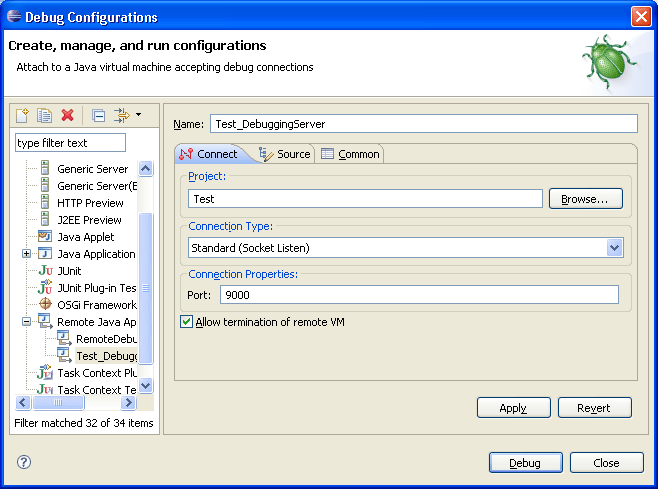
b) Started the debugging server in “Socket Listen” from eclipse.
c) Ran my applet code over the browser I could see my breakpoints in eclipse worked perfectly.
Reference: http://www.ibm.com/developerworks/java/library/os-eclipse-javadebug/index.html?ca=drs-
Here is some information to configure applet runtime parameter:
goto Windows Start > Control Panel > Java > Java (tab) > View (button) > Java Runtime Parameters.

As request, here is the eclipse configuration screen print. The connection type should be “Socket Listen”.

 Venkat Sadasivam
Leave a comment